How to check a graded card's cert: CGC, SGC, TAG
Where to look up a slab's cert number at CGC, SGC and TAG, what each record shows, and what it means when the record and the slab in your hand disagree.
By the Rip.fan Editorial Team.
Published 7 min read
To check a graded card’s cert, type the number from the slab’s label into the grading company’s own lookup. Then compare what comes back, meaning the card, the grade and the pictures, with the slab in your hand. CGC’s Verify tool confirms the card’s description and grade and shows images CGC took after sealing it. SGC’s lookup takes a 7-digit or an 11-character code, depending on the label’s color. TAG’s cert search opens the card’s digital report. Some mismatches between record and slab have a known, harmless cause, and others mean stop.
Where is each lookup, and what do you type?
| Company | Where to look | What to enter | Shortcut |
|---|---|---|---|
| CGC | Verify CGC Certification, on CGC’s own site | Pick Collectible Card from the drop-down, then type the cert number | The QR code on the back of the label opens the card and its images on CGC’s site |
| SGC | Cert Verification, on SGC’s own site, or the SGC app | All 7 digits on a black label; all 11 characters on a green or white label, written XXXXXXX-XXX | The app’s cert feature, with high-resolution images |
| TAG | Cert search, on TAG’s own site | The cert number, a mix of letters and numbers; sequential numbers are not available | The QR code on every TAG slab opens the card’s report |
The cert number is the slab’s identity, so type it in yourself; never trust a link from a seller. CGC’s drop-down also covers comics and other collectibles, so pick the card option first. On an SGC slab, count the characters before you type: a black label with 11 characters, or a green one with 7, does not fit SGC’s own format.
For a PSA or BGS slab, use the same habit on that company’s own site.
What does each record show?
The three records differ a lot in depth.
| What you can check | CGC | SGC | TAG |
|---|---|---|---|
| Card description | Yes, with the grade, in CGC’s database | Important information about the card, through the app | Name, year, set, card number and any subset |
| Images | Every card, imaged after it is sealed | High-resolution images through the app | Raw card images and slab images, with zoom |
| Population count | A link below the images opens the card in CGC’s pop report | Not described | On TAG Score reports, the card’s count and rank among TAG copies, each dated |
| Breakdown of the grade | No; CGC stopped giving subgrades when it merged with CSG in 2023 | Not described | Defect notes on every report; subgrades on fuller reports, though TAG gives conflicting lists of which levels get them |
| Measured size | Not described | Not described | Height and width, on TAG’s sample report |
How much does a TAG report hold?
TAG publishes a sample report for a 1989 Upper Deck card. That report shows the card’s name, year, set, number and subset. Beside them sit the 1 to 10 grade with its name, and the score out of 1,000. It also carries front and back images with a slider that brings out surface defects, and the date graded. Subgrades follow for centering, corners, edges and surface, front and back, with the card’s measured height and width and a numbered list of the defects TAG annotated.
Not every TAG report goes that far. TAG’s Regular grading report shows the grade and a section called DINGS, which marks the main causes of the grade. The full score out of 1,000 comes with the levels that include TAG Score. Our guide to TAG grading explains the reports.
How do you match the record to the slab?
Work through it in this order:
- The description. The card name, year, set, number and any variant should match both the label and the card.
- The grade and label. The grade online should match the label, allowing for the older-label cases below.
- The pictures. Put the record’s images beside the card. Centering, corners, edges and small print marks differ from copy to copy, so a swapped card of the same name usually shows itself here.
- The number itself. Each CGC cert number is unique to its label. If the same number turns up on two slabs, stop and ask CGC.
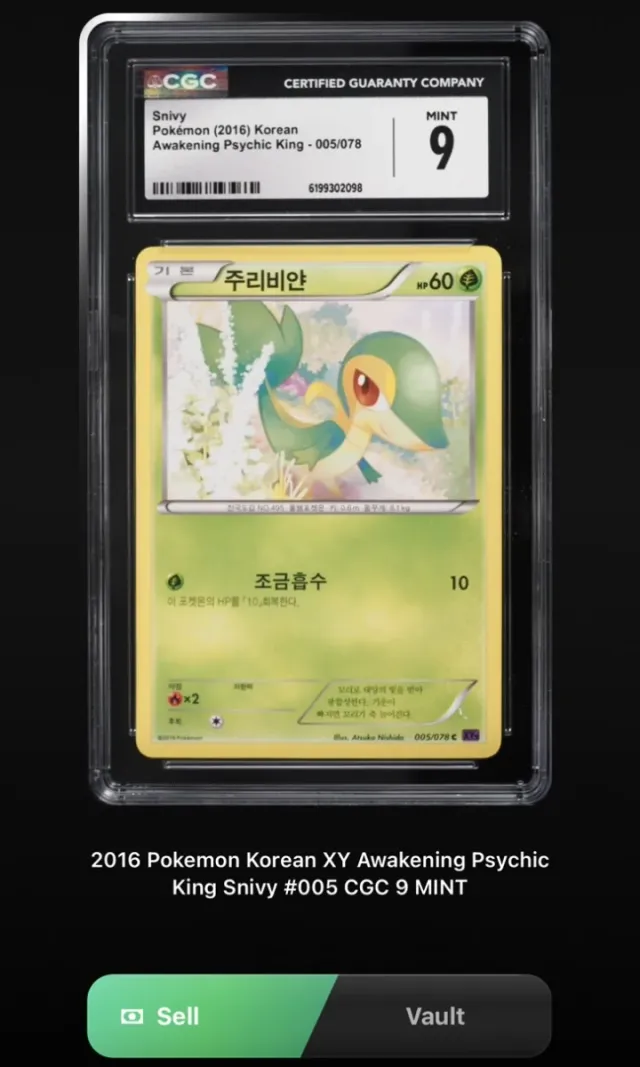
CGC’s Verify tool is meant to confirm that a CGC holder is genuine and free of tampering. The images are what make that work, because a copied number brings up someone else’s card. The physical checks on the holder and label are in our guide to spotting a fake slab.
What does a mismatch mean?
Some differences are expected. Others are a reason to stop.
| What you see | What it likely means | What to do |
|---|---|---|
| No record comes up | A typing slip, the wrong SGC format, or the wrong item type at CGC; or a slab the company never made | Retype, check the format, then contact the grader with photos |
| An old CGC label reads Gem Mint 9.5 and the record says 10 | Normal: since the 2023 merger, CGC shows these 9.5s as 10s online | Nothing |
| A CSG or CGC Trading Cards label | An older label that CGC’s Verify tool still covers | Nothing |
| A Perfect 10 label | An older top grade that CGC no longer gives but still supports | Nothing; CGC advises against reholdering it, which would make it a Pristine 10 |
| Subgrades on an older CGC Trading Cards label | CGC Trading Cards offered them; a reholder by CGC drops them | Think twice before a reholder |
| The record matches, but its images show a different copy | A possible swapped card or copied number | Do not open the slab; contact the seller and the grader |
| A typo on the label of a slab you just got back | A clerical error | Report it inside the grader’s window, below |
| An SGC code that no longer verifies | SGC may deactivate certs on cards or holders it believes altered, counterfeit or tampered with | Contact SGC and the seller |
| A TAG card graded 9 or lower with no DINGS entry | Possibly a data issue | Email TAG with the cert number |
How fast must you report a label error?
- SGC asks for errors in a card’s description within 5 business days of receipt. Your only remedy is for SGC to correct the error and reholder the card, at SGC’s cost.
- TAG reslabs for free when a label error or defect is reported within 10 days of the order’s arrival. Email TAG with your account email, the cert number, a short description and a photo of the error.
- CGC may correct clerical errors on a label through its ReHolder service, $10 a card, but the card must still be in its original CGC or CSG holder.
What if the record and the slab disagree?
Do not open the slab. Removing a card from its CGC holder voids CGC’s guarantee. TAG may not honor a grade on a card taken out of its case before it comes back. SGC can remove a card from its holder if it decides the card is fraudulent, tampered with or not accurately described.
Then:
- Keep the slab, the packaging and the listing.
- Contact the seller or platform inside its deadline. Our guide to buying graded cards online sets out eBay’s rules for reporting a problem.
- Contact the grading company with the cert number and photos of both sides of the slab.
If the slab came from a rip site’s vault, our guide to whether rip site cards are real covers where each site keeps its cards.
What else can a cert number do?
It is the key to your own records. CGC lets members add cards to a free account and build sets in its registry. SGC’s app has a My Cards feature for building a collection. TAG has no registry and cannot move a card bought from someone else into your account, but anyone can open a TAG card’s report by its number.
Write down the grader, the grade and the cert number for every slab. Our guides to storing graded cards and insuring a card collection explain why. For an English Pokémon card, the card price lookup shows the raw NM market price; a slab sells at its own price, so compare it only with sales of the same card in the same grade. Sending cards in yourself? See packing cards for grading and card grading mistakes to avoid. The glossary defines a slab and a pop report.
Frequently asked questions
What is on the back of a CGC label?
A QR code that opens the card and its images on CGC's site, plus any autograph grade, which CGC gives on sports cards with a manufacturer's certified autograph. A pedigree naming the card's past or present owner can be added there too.
How do I reach CGC about a cert that looks wrong?
Call, text or WhatsApp CGC on 855-472-3310, also listed as 1-855-GRADE10, or use the form on its site. CGC never charges to be contacted.
Do TAG's report images show the card before or after grading?
As it arrived. TAG keeps each card in its shield until it is imaged, and it generally can't accept a customer's own raw photos in a dispute, so it asks senders to film every card, front and back, while packing.
What does TAG pay if it damages a card?
Compensation rests on the card's fair market value in its TAG graded condition, and generally can't exceed the maximum insured value you chose when you bought grading. TAG may ask for the card back to inspect it, which can take weeks.