Card scanner
Take a photo of a card, or choose one you already have. The scanner reads the card's name, set and number and shows the cards in our price list that fit, for you to pick from. Graded cards work too: it reads the grading company, the grade and the cert number from the label. There is no account and nothing to sign up for.
Prices checked
or drop a photo on the frame
Your photo is made smaller on this device, which drops its location data, then sent to our server and to OpenAI, whose model reads the card. We never save or log your photo.
How to take a photo it can read
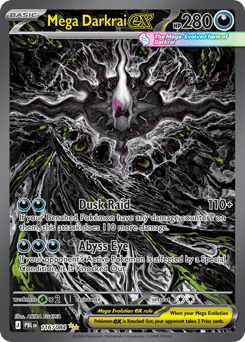 Mega Darkrai ex Pitch Black, 116/084 NM market price $141.59
How the scanner works
When you take or choose a photo, your device makes it smaller and sends it to Rip.fan's server. The server asks OpenAI's model to read the card's printed details: its name, its set code or set name, and its number, and for a graded card the label. It then looks for those details in our weekly price check and shows up to five cards that fit, each with its picture, so you can pick yours.
A card our weekly price check covers shows its NM market price for the printing named, as on our card pages, and its other printings below. A card we do not price yet, of another kind or in another language, says "No price on Rip.fan yet". Add to my collection saves the card to the collection tracker, in this browser only.
Your photo goes from your device through Cloudflare, which carries all of Rip.fan's traffic, to our server and on to OpenAI. Rip.fan never saves or logs it. OpenAI may keep it for up to 30 days to check for abuse, and does not use it to train its models. The privacy policy has the details.
Find a card by name with the card price lookup, which reads the same weekly price check, or keep a list of the cards you own with the collection tracker. How our card prices work explains what the figures are and what they are not.
Frequently asked questions
Which cards can it read?
Pokémon, Magic: The Gathering, Yu-Gi-Oh!, One Piece, Lorcana and sports cards, raw or graded. It shows a price only for cards our weekly price check covers, which today means English Pokémon cards. Any other card says: No price on Rip.fan yet.
What happens to my photo?
Your device makes it smaller, which also drops its location data, and sends it to Rip.fan's server, which sends it on to OpenAI to read the card's printed details. Rip.fan never saves or logs the photo. OpenAI may keep it for up to 30 days to check for abuse, and does not use it to train its models.
Does it work on graded cards?
Yes. Keep the whole slab in the photo with the label sharp. The scanner reads the grading company, the grade and the cert number from the label and finds the card inside. The label also names the printing, such as a reverse holo or the cosmos holo from a collection, and the scanner shows that printing. Graded prices are not in our data yet, so it shows the price of an ungraded NM copy and says so. Check a cert number with the grading company before you rely on it.
Why does it ask me to pick the card?
Many cards share a name or a number, and a photo can hide small print. The scanner lists up to five cards that fit what it read, so you can pick yours by its picture. When it is sure, it shows one card first and the others below it.
Prices and images from Scrydex. Prices checked .